Auto-installer
Auto-installer is a guided tool to flash your BOS target device, set up your Linux host, and install the BOS AI Model SDK in your environment.
With Auto-installer, you do not need to manually follow each step in the installation guide. The setup flow is automated from end to end.
Get access to the git, and run the Auto installer. It automatically sets up your x86 host machine, flashes the evaluation board (if you have one), and installs everything you need to run your first model demo.
Quickstart
# Available from SDK v0.2.0
git clone --branch <SDK_VERSION> https://github.com/bos-semi-release/auto-installer.git
cd auto-installer
bash auto-installer.sh

Example:

git clone --branch v0.2.0 https://github.com/bos-semi-release/auto-installer.git
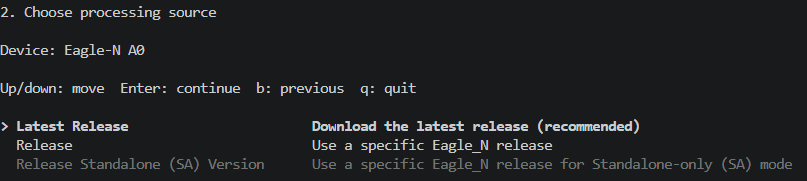
After launching the script, you will:
- Choose your BOS target device.
- Choose the software release (
latestor a specific version). - Choose the installation type.
Simple Workflow
What Auto Installer Does
Auto-installer helps customers prepare both the host environment and the Eagle-N A0 device from one guided flow.
Depending on the options you choose, it can:
- Check the target platform and guide you through the install flow
- Download BOS release content into a dedicated download workspace
- Install the BOS NPU driver
- Configure hugepages on the host
- Download Eagle-N A0 firmware
- Set up fastboot tools and flash the device
- Stage and install TT-metal / TT-nn components
- Offer follow-up steps such as TT-metal build and Python environment setup
Install Modes
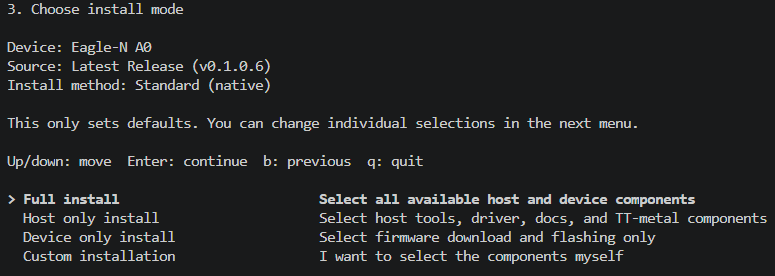
The installer provides four simple installation modes:
Full install: includes all required components to run your first model on a BOS target device.Host only install: installs only host-side components and setup.Device only install: selects firmware for your board and flashes the target.Custom installation: for advanced users who want to select each component manually.
Full Install Expectations
When running Full install, the installer downloads required packages from Git repositories first.
- Ensure your GitHub account can access BOS release repositories such as
bos-semi-release. - If access is missing, request it through the Contact form on developer.bos-semi.com.
After download and installation complete, Auto-installer can also offer to build the BOS AI model stack for you.
Typical duration for a full download, install, and build is around 30 minutes (environment and network dependent).
What You Can Select
The current branch supports customer-visible modules such as:
Device
- BOS NPU driver
- Hugepages setup
- Firmware download
- Firmware flash
Host
- TT-metal / TT-nn
- TT-metal build
- TT-metal Python environment
Other
- Documentation and help resources
Platform Notes
- Recommended and validated platform:
Ubuntu 22.04 - GitHub SSH access to BOS release repositories is expected for source downloads
Typical Use Cases
- Prepare a new host for BOS driver and runtime setup
- Download and flash Eagle-N A0 firmware
- Set up TT-metal / TT-nn sources for BOS development
- Run a guided install without manually stitching together multiple repositories and scripts
Summary
Auto-installer is a guided CLI installer for BOS customers who need a simpler way to prepare the Eagle-N A0 software environment. It brings host setup, firmware preparation, and TT-metal-related setup into one place while keeping the installation flow modular and selectable.
Once setup is complete, you can run BOS validated models or start your own model implementation workflow.
Questions? Reach us through developer.bos-semi.com and the Contact page.
Next Step
Run AI models on the Eagle-N A0 board
To run an AI model, refer to the guides listed in Validated Models